2015年8月4日 星期二

Java上課練習:多執行緒_實作 Runnable 介面

實作 Runnable 介面,比繼承 Thread 更具彈性

Java 類別只能單一繼承,盡量採用實作 Runnable,將 Runnable 交給 Thread 執行

類別圖


多執行緒(Thread)的程式使用Runnable改寫,使用兩個執行緒處理一個程式
class 任務 extends Thread{
    int i;
    public void run(){
        for(;i<100;i++){
            String name=Thread.currentThread().getName();//取得目前執行緒的名稱
            System.out.println(name+":"+i);
        }
    }           
}

public class Test3 {

    public static void main(String[] args) {
        任務 task =new 任務(); 
        //兩個執行緒共用一個task
        Thread t1=new Thread(task);//Thread-0
        Thread t2=new Thread(task);//Thread-1
        t1.start();
        t2.start();

    }
}

顯示結果


Q:為什麼 i 沒有連續?
Ans:因為 i++ 並非原子性操作,電腦的運算往往不是一個動作能完成
           i ++  看似是一個動作,實際上需要三個動作
            1. 將記憶體資料放入CPU
        2. CPU執行加1
        3. 將CPU運算結果放回記憶體

Java上課練習:多執行緒_下載檔案

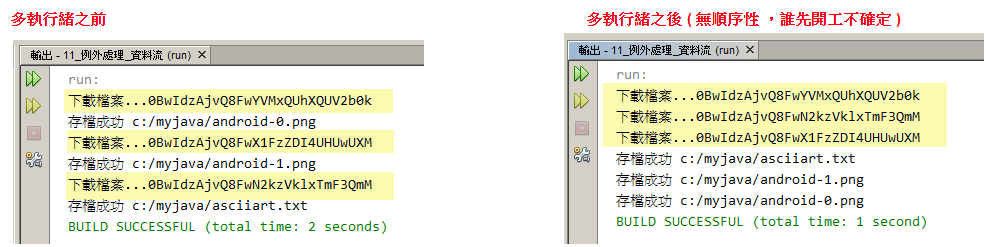
下載檔案使用多執行緒


import java.io.*;
import java.net.URL;
import java.nio.file.*;

//建立執行緒
class 小弟 extends Thread {

    private String id; //下載檔案的id
    private String saveFileName;//下載後儲存檔案的名稱

    public 小弟(String id, String saveFileName) {
        this.id = id;
        this.saveFileName = saveFileName;
    }

    @Override
    public void run() {
        copyFileFromGoogleDrive();
    }

    public void copyFileFromGoogleDrive() {
        try {
            System.out.println("下載檔案..." + id);
            URL url = new URL("https://drive.google.com/uc?id=" + id);
            InputStream is = url.openStream();
            Path savePath = Paths.get(saveFileName);//存檔路徑
            Files.copy(is, savePath, StandardCopyOption.REPLACE_EXISTING);//檔案存在就覆蓋
            System.out.println("存檔成功" + saveFileName);
        } catch (IOException e) {
            System.out.println(e);
        }
    }
}

public class 多執行緒下載檔案Test {

    public static void main(String[] args) {

        小弟 a = new 小弟("0BwIdzAjvQ8FwYVMxQUhXQUV2b0k", "C:/Users/Administrator/Desktop/MyJava/android-0.png");
        小弟 b = new 小弟("0BwIdzAjvQ8FwX1FzZDI4UHUwUXM", "C:/Users/Administrator/Desktop/MyJava/android-1.png");
        小弟 c = new 小弟("0BwIdzAjvQ8FwN2kzVklxTmF3QmM", "C:/Users/Administrator/Desktop/MyJava/asciiart.txt");
        a.start();
        b.start();
        c.start();
    }
}
執行結果


2015年8月3日 星期一

Java上課練習:多執行緒

多執行緒(multi-thread)

可以同時執行多個程式區塊,使程式執行的效率變高

範例:
列印100次Hello(單執行緒)
 1
 2
 3
 4
 5
 6
 7
 8
 9
10
11
public class Test1 {
    
    public static void main(String[] args) {

        for (int i = 0; i < 100; i++) {
            System.out.println("MAin Hello " + i);
        }

    }

}
顯示結果:
MAin Hello 0
MAin Hello 1
MAin Hello 2
MAin Hello 3
MAin Hello 4
.....
MAin Hello 97
MAin Hello 98
MAin Hello 99

多執行緒:建立一個hello class 繼承 Thread,將迴圈寫在執行緒的實作mothod
在原本main迴圈下,新增兩組執行緒
有三個執行緒在執行,main 執行緒執行 main() ,建立了另外兩個執行緒 h1 與 h2
h1和h2沒有先後之分,完全取決於程式
且每次執行結果不會一樣,每個執行緒分配到多少時間是不固定的
 1
 2
 3
 4
 5
 6
 7
 8
 9
10
11
12
13
14
15
16
17
18
19
20
21
22
23
24
25
26
27
28
29
30
31
32
33
34
//建立執行緒
class Hello extends Thread {

    public void run() { //執行緒實作的方法,工作內容
        for (int i = 0; i < 100; i++) {
            System.out.println(getName()+" hello " + i);
        }

    }
}

public class Test1 {
    
    public static void main(String[] args) {
        //main 執行緒執行 main() 
        //main()
        for (int i = 0; i < 100; i++) {
            System.out.println("MAin Hello " + i);
        }
        
        //建立 h1 執行緒
        Hello h1 = new Hello();
        h1.setName("h1"); //指定執行緒名稱
        //h1.run(); //呼叫,使用此方法還是單執行緒
        h1.start(); //啟動 h1 執行緒,不是呼叫 Thread,而是要啟動
        
        //建立 h2 執行緒
        Hello h2 = new Hello();
        h2.setName("h2");
        h2.start();

    }

}
顯示結果
MAin Hello 97
MAin Hello 98
MAin Hello 99
h2 hello 0
h1 hello 0
h2 hello 1

當執行緒 start( ) 後,不能重複啟動,否則會導致 IlleagalThreadStateException 例外

多執行緒摘要

  • 執行順序執行順序 與 程式開工(啟動)順序無關,由系統控制
  • 每個執行緒所分配到的 CPU 時間不是固定的,由系統控制
  • 執行緒啟動後,由系統分配時間執行 run( ) ,我們不會自己主動去呼叫 run( )
  • 主類別 main() 方法的執行,是由系統產生的 main執行緒 執行
  • 執行緒 start( ) 後,不能重複啟動,會導致例外
  • 取得執行當前程式碼的執行緒
    Thread.currentThread()
  • 取得 與 設定 執行緒物名稱
    getName( )
    setName( )


2015年7月31日 星期五

Java作業練習01:學生成績排名

完成 Student 類別,依總分由大排到小,總分相同比英文,英文相同比數學,數學相同比名字,名字相同則亂數決定

Student 類別
 1
 2
 3
 4
 5
 6
 7
 8
 9
10
11
12
13
14
15
16
17
18
19
20
21
22
23
24
25
26
27
28
29
30
31
32
33
34
public class Student implements Comparable<Student> {

    String name;
    int eng;
    int math;
    int sum;

    public Student(String name, int eng, int math) {
        this.name = name;
        this.eng = eng;
        this.math = math;
        this.sum = eng + math;
    }

    @Override
    public String toString() {
        return name + " " + eng + " " + math + " " + sum;
    }

    @Override
    public int compareTo(Student o) {
        if (this.sum > o.sum) {
            return -1;
        } else if (this.sum == o.sum && this.eng > o.eng) {
            return -1;
        } else if (this.eng == o.eng && this.math > o.math) {
            return -1;
        } else if (this.math == o.math && this.name.compareTo(o.name)<0) { //名字字串比對
            return -1;
        } else if (this.name.compareTo(o.name)== 0){
            return (int) Math.random()*10;
        }return 1;
    }
}

StudentTest 主程式
 1
 2
 3
 4
 5
 6
 7
 8
 9
10
11
12
13
14
15
16
17
18
19
20
public class StudentTest {

    public static void main(String[] args) {
       Set<Student> set =new TreeSet<>();
       set.add(new Student("Tom", 100, 90)); //190
       set.add(new Student("Amy", 95, 100)); //195
       set.add(new Student("Joe", 95, 95)); //190
       set.add(new Student("Lee", 100, 90)); //190
       
       //依總分由大排到小,總分相同比英文,英文相同比數學,數學相同比名字,名字相同則亂數決定 
       System.out.println("成績排行");
       int rank=0;
       for(Student stu:set){
           rank++;
           System.out.println(rank+". "+stu.toString());
       }

    }

}

顯示結果


code
Student
StudentTest

Java上課練習:Object類別與集合_自動排序物件的集合

TreeSet:自動排序物件的集合

新增一個 TreeSetTest 主程式

 1
 2
 3
 4
 5
 6
 7
 8
 9
10
11
12
13
14
15
16
17
18
19
20
21
22
23
24
25
26
27
28
29
30
import java.util.*;

public class TreeSetTest {

    public static void main(String[] args) {
        //Set介面,不重複
        //TreeSet,不重複,有排序性
        Set<Integer> set = new TreeSet<>();//隨時可以將TreeSet更換為其他實作介面,只要是Set有的
        /*
         宣告 參考變數(set) 使用 介面(Set)而不是使用TreeSet,方便將來更換不同的集合,讓程式將來修改時更容易
         Set介面可實作的類別很多,TreeSet是其中一個,之後如果修改,可以將TreeSet修改為HashSet
         下面的程式碼都不需要異動
         Set<Integer>指泛型,只要是Integer的類型都可以加入
         */
        set.add(10);
        set.add(5);
        set.add(7);
        set.add(3);

        Set<String> set2 = new TreeSet<>();
        set2.add("C");
        set2.add("A");
        set2.add("F");
        set2.add("B");

        System.out.println(set);
        System.out.println(set2);
    }

}

顯示結果


若將 Animal物件放入TreeSet
//嘗試將 Animal 物件放入 TreeSet
        Animal a = new Dog();
        a.setName("小白");

        Animal b = new Cat();
        b.setName("小花");

        Animal c = new Bird();
        c.setName("小飛");

        Set<Animal> set3 = new TreeSet<>();
        set3.add(a);
        set3.add(b);
        set3.add(c);

若要將動物也使用TreeSet會出現錯誤,因為動物無法排序,
將 a 加入 TreeSet ,轉型失敗, a 所操作的 Dog 物件
無法轉成 java.lang.Comparable 型別
所以會出現下面的結果


TreeSet 只接受具有 Comparable 特性的物件
所以要在 Animal 插入介面 Comparable<Animal>,並且加入自定的規則
abstract public class Animal implements 有攻擊能力的, Comparable<Animal> { // 抽象類別

    @Override //定義Animal的大小判定,以下以字串名字長度為判斷標準
    public int compareTo(Animal o) {
        return this.name.length()-o.name.length(); 
        /*
        可將下面判斷方式簡化,若要由大排到小,將運算結果前面加上負號即可
        return -(this.name.length()-o.name.length());
        */
        
//        if (this.name.length() > o.name.length()) {
//            return 0;
//        } else if (this.name.length() > o.name.length()) {
//            return -1;
//        } else {
//            return 0;
//        }
        /*
        返回:負整數、零或正整數,根據此物件是小於、等於還是大於指定物件。
        */
    }

}

再次執行TreeSet
        //嘗試將 Animal 物件放入 TreeSet
        Animal a = new Dog();
        a.setName("小白A");

        Animal b = new Cat();
        b.setName("小花");

        Animal c = new Bird();
        c.setName("小飛");
        
        //判斷大小compareTo
//        System.out.println("");
//        int result = a.compareTo(b);
//        System.out.println("a.compareTo(b) = " + result);
//        result=b.compareTo(c);
//        System.out.println("b.compareTo(c) = "+result);

        Set<Animal> set3 = new TreeSet<>();
        set3.add(a);
        set3.add(b);
        set3.add(c);
        System.out.println(set3);
        /*
         若要將動物也使用TreeSet會出現錯誤,因為動物無法排序
         Dog cannot be cast to java.lang.Comparable
         將 a 加入 TreeSet ,轉型失敗, a 所操作的 Dog 物件 無法轉成 java.lang.Comparable 型別
         TreeSet 只接受具有 Comparable 特性的物件
         所以要在Animal插入介面Comparable<Animal>,並且加入自定的規則
         */
        /*
        當加入Comparable<Animal>後,WHY小飛還是沒有出現
        因為 b.compareTo(c) 的結果為 0,表示 b 與 c 相等,TreeSet 不重複的特性,所以 c(小飛) 不會放進 TreeSet 裡
        ( TreeSet 使用 compareTo() 判斷相等性 ,HashSet 使用 equals() 判斷相等性)
        */

顯示結果


為什麼 小飛 不在 TreeSet 裡 ?
因為 b.compareTo(c) 的結果為 0,表示 b 與 c 相等,TreeSet 不重複的特性,所以 c(小飛) 不會放進 TreeSet 裡
( TreeSet 使用 compareTo() 判斷相等性 ,HashSet 使用 equals() 判斷相等性)

最後整個 Animal 的關聯


code
Animal
TreeSetTest

Java上課練習:Object類別與集合_ArrayList 與 HashSet 集合

ArrayList 與 HashSet 集合

新增一個 HashSetTest 主程式

宣告參考變數使用介面,方便將來更換不同的集合,讓程式將來修改時更容易;
例如,LinkedList 也實作了 List 介面

 1
 2
 3
 4
 5
 6
 7
 8
 9
10
11
12
13
14
15
16
17
18
19
20
21
22
23
24
25
26
27
28
29
30
31
32
33
34
35
36
37
38
39
40
41
42
43
44
45
46
47
48
49
50
51
import java.util.*; //java.unti套件裡所有的類別


public class HashSetTest {

    public static void main(String[] args) {
        
        Animal a=new Dog();
        a.setName("小白");
        
        Animal b=new Cat();
        b.setName("小花");
        
        Animal c=new Bird();
        c.setName("小飛");
        
        Animal d=new Dog();
        d.setName("小白");
        
        //List介面,有順序姓,可重複
        List<Animal> list=new ArrayList<>(); //隨時可以將ArrayList更換為其他實作介面,只要是List有的
        /*
        宣告 參考變數(list) 使用 介面(List)而不是使用ArrayList,方便將來更換不同的集合,讓程式將來修改時更容易
        List介面可實作的類別很多,ArrayList是其中一個,之後如果修改,可以將ArrayList修改為LinkedList
        下面的程式碼都不需要異動
        List<Animal>指泛型,只要是Animal類別的都可以加入
        */
        list.add(a);
        list.add(b);
        list.add(c);
        list.add(d);
        
        //Set介面,無順序姓,不重複
        Set set=new HashSet(); //同List說明
        set.add(a);
        set.add(b);
        set.add(c);
        set.add(d);
        /*
        若Animal沒有覆寫equals,set集合會出現兩個Dog小白
        因為 Object 的 equals() 使用 == 判斷相等,只有是同一個物件的情況下才會相等
        所以當沒有覆寫equals時,是兩個不同的Dog小白
        */
        
        System.out.println(list);
        System.out.println(set);
        //若要出現的訊息不是顯示雜訊碼,需要再Animal加入toString

    }

}

修改 AnimaltoString(),使其文字顯示為 物件類別.物件名稱=指定的名字
    @Override
    public String toString() {
        return this.getClass().getName() + "{name=" + name + '}';
        //顯示 物件類別.物件名稱=指定的名字
    }

顯示結果如下


如果 Animal 沒有覆寫 equals(),Set 集合會出現兩個 Dog小白
因為 Object 的 equals() 使用 == 判斷相等,只有同一個物件的情況下才會相等 ( 現在是兩個不同的小白物件 )


************************************************************************************
HashSet使用雜湊碼可以提高搜尋效率

************************************************************************************
Set 的應用
增加一個水果字串,並且使用HashSet(),將水果字串放入
 1
 2
 3
 4
 5
 6
 7
 8
 9
10
11
12
13
14
15
16
import java.util.*;

//Set的應用
public class HashSeDemo {

    public static void main(String[] args) {
        String[] fruit = {"蘋果", "香蕉", "鳳梨", "芭樂", "蘋果", "香蕉"};//建立一組水果字串
        Set set = new HashSet();//建立物件
        for (String s : fruit) { //將水果字串一個一個放入迴圈中判斷
            set.add(s); //將水果放入set中,刪除重複
        }
        System.out.println("一共有"+set.size()+"種水果");
        System.out.println(set);//列出水果
    }

}
顯示結果


code
Animal
HashSetTest
HashSetDemo

Java上課練習:Object類別與集合

12_Object類別與集合

根據練習10_抽象類別 與 介面 完成code


 1
 2
 3
 4
 5
 6
 7
 8
 9
10
11
12
13
14
15
16
17
18
19
20
21
22
23
24
25
26
27
28
29
30
31
32
33
34
35
36
37
38
39
40
41
42
43
44
45
46
47
48
49
50
51
52
53
54
55
56
57
58
59
60
61
62
63
64
65
66
67
68
69
70
71
72
73
74
interface 有攻擊能力的 {
    void attack(); // 自動補上 public abstract
}

 interface 會飛的 {
    void fly();  // 自動補上 public abstract
}


abstract public class Animal implements 有攻擊能力的 { // 抽象類別
    private String name; //封裝,隱藏資訊>setter&getter
    abstract public void attack(); // 抽象方法

//setter&getter
    public String getName() {
        return name;
    }


    public void setName(String name) {
        this.name = name;
    }
    
    public void print(){
        System.out.println("我的類別是" + this.getClass().getName() + ",名字叫" + name);
    }
    
}


class Dog extends Animal {
    @Override
    public void attack() { // 實作
        System.out.println("用牙齒咬");
    }
}

class Cat extends Animal {
    @Override
    public void attack() { // 實作
        System.out.println("用貓爪");
    }
}

// Bird 繼承 Animal 實作 會飛的 介面
class Bird extends Animal implements 會飛的 {
    @Override
    public void attack() { // 實作
        System.out.println("用頭撞");
    }
    @Override
    public void fly() {
        System.out.println("飛起來");
    }
}

// Airplane 自動繼承 Object 實作 會飛的 介面
class Airplane implements 會飛的 {
    @Override
    public void fly() {
        System.out.println("飛機起飛");
    }
}

class Superman implements 有攻擊能力的, 會飛的 {
    @Override
    public void attack() {
        System.out.println("超人 雷射攻擊");
    }
    @Override 
    public void fly() {
        System.out.println("超人 超音速飛行");
    }
}

其中 print()是繼承Object,取得該類別的名稱 getClass().getName()
public void print(){
        System.out.println("我的類別是" + this.getClass().getName() + ",名字叫" + name);
    }

新增一個AnimailTest主程式執行
 1
 2
 3
 4
 5
 6
 7
 8
 9
10
public class AnimalTest {

    public static void main(String[] args) {
        Animal a;
        a = new Dog();
        a.setName("小白");
        a.print();
        a.attack();
    }
}

顯示結果

AnimailTest主程式中加入Object 類別 toString()
 1
 2
 3
 4
 5
 6
 7
 8
 9
10
11
12
13
14
15
16
17
18
19
20
21
22
23
public class AnimalTest {

    public static void main(String[] args) {
        Animal a;
        a = new Dog();
        a.setName("小白");
        a.print();
        a.attack();
        
        System.out.println("");
        System.out.println(a.getName()+"字串長度="+a.getName().length());
        
        System.out.println("");
        System.out.println(a.toString());//toString()從 Object 繼承
        System.out.println(a);//效果同上
        
        System.out.println("");
        System.out.println("基本資料="+a.toString());
        System.out.println("基本資料="+a);
               
    }

}

顯示結果


顯示結果中顯示的 Dog@19a32e0 為雜訊碼(hashcode),若要顯示正常字串,要在 Animal 類別中覆寫 toString( )

    @Override
    public String toString() {
        return "Animal{" + "name=" + name + '}';
    }

顯示結果

*************************************************************************************
物件的相等性
AnimailTest主程式中加入新的 Animal b=new Dog()
        //物件相等性
        System.out.println("");
        Animal b=new Dog();
        b.setName("小白");
        b.print();
        a.print();
        System.out.println("a==b is "+(a==b)); //兩個是否參考相同物件,是否共用同一個物件
        /*
        a新增一個物件Dog,b也新增一個物件Dog,所以a和b不是共用一個物件
        */
        System.out.println("a.equals(b) is "+a.equals(b)); //兩個物件,是否相等(比對欄位值)
        /*
        equals是比對Object內欄位是否 a==b,若沒有Override,則兩者沒有差異
        所以要覆寫Object的equals,至於要比對那些欄位才算兩個Object相等,由設計者決定
        例如,兩個員工是否相等,比對員工編號即可,不須比對電話、地址等欄位
        以此為例,在Animal中Override equals後,則a.equals(b)會判斷名字是否相同,若相同即回傳true
        若將b改為Cat,則a.equals(b),雖然名字一樣,但類別不一樣,所以回傳false
        */

== 兩個是否參考相同物件,是否共用同一個物件
equals 兩個物件,是否相等(比對欄位值)

equals是比對Object內欄位是否 a==b,若沒有Override,則兩者沒有差異
所以要覆寫Object的equals,至於要比對那些欄位才算兩個Object相等,由設計者決定
例如,兩個員工是否相等,比對員工編號即可,不須比對電話、地址等欄位
以此為例,在Animal中Override equals後,則a.equals(b)會判斷名字是否相同,若相同即回傳true
若將b改為Cat,則a.equals(b),雖然名字一樣,但類別不一樣,所以回傳false

Animal 類別中覆寫 equals( )
//通常覆寫equals會一併覆寫hashCode(雜訊碼)
    @Override
    public int hashCode() {
        int hash = 7;
        hash = 23 * hash + Objects.hashCode(this.name);
        return hash;
    }

    @Override
    public boolean equals(Object obj) {
        //a的equals和b比對,obj=b
        if (obj == null) { //判斷obj是否有物件
            return false;
        }
        if (getClass() != obj.getClass()) { //判斷a物件類別和b的物件類別是否相同,以此例要判斷是否為Dog類別(a)
            return false;
        }
        final Animal other = (Animal) obj; //將obj轉換同a的物件(Animal)
        if (!Objects.equals(this.name, other.name)) { //判斷a的物件名字和b的物件名字是否相同
            return false;
        }
        return true;
    }
通常覆寫equals()會一併覆寫hashCode()(雜訊碼)

在執行AnimailTest主程式會顯示以下結果

code
Animal
AnimalTest